Extract Data from Chrome Database.

Today we extract data from google-chrome sqllite database using python script.Chrome contain lots of information in its database like history ;cookies; search history ; autofill ;download ;addons and more.Database location are different in different O.S.

In windows C:\\Users\user_name/AppData/Local/Google/Chrome/User Data/Default/

In linux /root/.config/google-chrome/Default

Extract Autofill data script:-

#!/usr/bin/python

import re
import optparse
import os
import sqlite3

def printLoginData(LoginData):
try:
conn = sqlite3.connect(LoginData)
c = conn.cursor()
c.execute(‘SELECT name, value FROM autofill’)

print ‘\n[*] — Found url –‘
for row in c:

print str(row[0]) + ” ” + str(row[1])
except Exception, e:
if ‘encrypted’ in str(e):
print ‘\n[*] Error reading your cookies database.’
print ‘[*] Upgrade your Python-Sqlite3 Library’

def main():
parser = optparse.OptionParser(“usage %prog “+\
“-p ”
)
parser.add_option(‘-p’, dest=’pathName’, type=’string’,\
help=’specify chrome profile path’)

(options, args) = parser.parse_args()
pathName = options.pathName
if pathName == None:
print parser.usage
exit(0)
elif os.path.isdir(pathName) == False:
print ‘[!] Path Does Not Exist: ‘ + pathName
exit(0)
else:
LoginData = os.path.join(pathName, ‘Web Data’)
printLoginData(LoginData)

if __name__ == ‘__main__’:
main()

Extract Cookies from Database:-

#!/usr/bin/python
# -*- coding: utf-8 -*-

import re
import optparse
import os
import sqlite3
def printCookies(cookiesDB):
try:
conn = sqlite3.connect(cookiesDB)
c = conn.cursor()
c.execute(‘SELECT host_key, name, value FROM Cookies’)

print ‘\n[*] — Found Cookies –‘
for row in c:
host = str(row[0])
name = str(row[1])
value = str(row[2])
print ‘[+] Host: ‘ + host + ‘, Cookie: ‘ + name \
+ ‘, Value: ‘ + value
except Exception, e:
if ‘encrypted’ in str(e):
print ‘\n[*] Error reading your cookies database.’
print ‘[*] Upgrade your Python-Sqlite3 Library’
def main():
parser = optparse.OptionParser(“usage %prog “+\
“-p ”
)
parser.add_option(‘-p’, dest=’pathName’, type=’string’,\
help=’specify Chrome profile path’)

(options, args) = parser.parse_args()
pathName = options.pathName
if pathName == None:
print parser.usage
exit(0)
elif os.path.isdir(pathName) == False:
print ‘[!] Path Does Not Exist: ‘ + pathName
exit(0)
else:
cookiesDB = os.path.join(pathName, ‘Cookies’)
if os.path.isfile(cookiesDB):
pass
printCookies(cookiesDB)
else:
print ‘[!] Cookies Db does not exist:’ + cookiesDB

if __name__ == ‘__main__’:
main()

Extract history From Database:-

#!/usr/bin/python
import re
import optparse
import os
import sqlite3
def printCookies(cookiesDB):
try:
conn = sqlite3.connect(cookiesDB)
c = conn.cursor()
c.execute(‘SELECT url, title FROM urls’)

print ‘\n[*] — Found History –‘
for row in c:
host = str(row[0])
name = str(row[1])

print str(row[0]) + ” Title:” + str(row[1])
except Exception, e:
if ‘encrypted’ in str(e):
print ‘\n[*] Error reading your cookies database.’
print ‘[*] Upgrade your Python-Sqlite3 Library’
def main():
parser = optparse.OptionParser(“usage %prog “+\
“-p ”
)
parser.add_option(‘-p’, dest=’pathName’, type=’string’,\
help=’specify chrome profile path’)

(options, args) = parser.parse_args()
pathName = options.pathName
if pathName == None:
print parser.usage
exit(0)
elif os.path.isdir(pathName) == False:
print ‘[!] Path Does Not Exist: ‘ + pathName
exit(0)
else:
cookiesDB = os.path.join(pathName, ‘History’)
if os.path.isfile(cookiesDB):
pass
printCookies(cookiesDB)
else:
print ‘[!] Cookies Db does not exist:’ + cookiesDB

if __name__ == ‘__main__’:
main()

You can also create your script to extract other data from database.

Usage of script:-

chmod +x script_name

./script_name.py -p path of db according to your O.s.
Extract Data From Firefox Database.

Today we extract data from firefox sqllite database using python script.Firefox contain lots of information in its database like history ;cookies; search history ; autofill ;download ;addons and more.Databse location are different in different O.S.

In windows C:\\Users\user_name/AppData/Roaming/Mozilla/Firefox/Profile/your_folder/

In linux /root/.Mozilla/Firefox/Profile/your_folder/

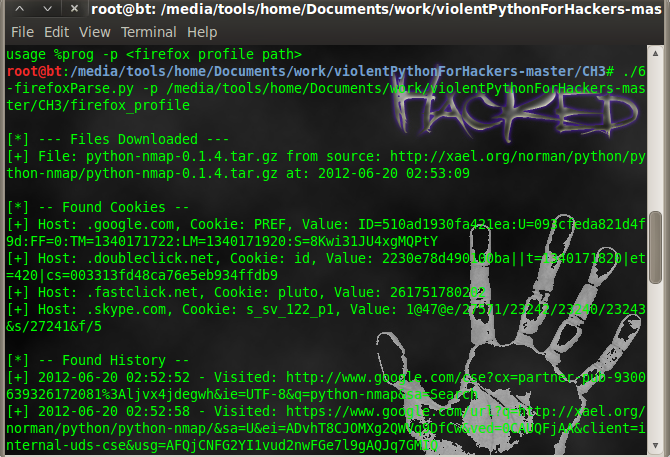
we only extract history ;download ;cookies ; google history.If you want to extract other data just little modification is required.

#!/usr/bin/python
import re
import optparse
import os
import sqlite3

def printDownloads(downloadDB):
conn = sqlite3.connect(downloadDB)
c = conn.cursor()
c.execute(‘SELECT name, source, datetime(endTime/1000000,\
\’unixepoch\’) FROM moz_downloads;’
)
print ‘\n[*] — Files Downloaded — ‘
for row in c:
print ‘[+] File: ‘ + str(row[0]) + ‘ from source: ‘ \
+ str(row[1]) + ‘ at: ‘ + str(row[2])

def printCookies(cookiesDB):
try:
conn = sqlite3.connect(cookiesDB)
c = conn.cursor()
c.execute(‘SELECT host, name, value FROM moz_cookies’)

print ‘\n[*] — Found Cookies –‘
for row in c:
host = str(row[0])
name = str(row[1])
value = str(row[2])
print ‘[+] Host: ‘ + host + ‘, Cookie: ‘ + name \
+ ‘, Value: ‘ + value
except Exception, e:
if ‘encrypted’ in str(e):
print ‘\n[*] Error reading your cookies database.’
print ‘[*] Upgrade your Python-Sqlite3 Library’

def printHistory(placesDB):
try:
conn = sqlite3.connect(placesDB)
c = conn.cursor()
c.execute(“select url, datetime(visit_date/1000000, \
‘unixepoch’) from moz_places, moz_historyvisits \
where visit_count > 0 and moz_places.id==\
moz_historyvisits.place_id;”)

print ‘\n[*] — Found History –‘
for row in c:
url = str(row[0])
date = str(row[1])
print ‘[+] ‘ + date + ‘ – Visited: ‘ + url
except Exception, e:
if ‘encrypted’ in str(e):
print ‘\n[*] Error reading your places database.’
print ‘[*] Upgrade your Python-Sqlite3 Library’
exit(0)

def printGoogle(placesDB):
conn = sqlite3.connect(placesDB)
c = conn.cursor()
c.execute(“select url, datetime(visit_date/1000000, \
‘unixepoch’) from moz_places, moz_historyvisits \
where visit_count > 0 and moz_places.id==\
moz_historyvisits.place_id;”)

print ‘\n[*] — Found Google –‘
for row in c:
url = str(row[0])
date = str(row[1])
if ‘google’ in url.lower():
r = re.findall(r’q=.*\&’, url)
if r:
search=r[0].split(‘&’)[0]
search=search.replace(‘q=’, ”).replace(‘+’, ‘ ‘)
print ‘[+] ‘+date+’ – Searched For: ‘ + search

def main():
parser = optparse.OptionParser(“usage %prog “+\
“-p ”
)
parser.add_option(‘-p’, dest=’pathName’, type=’string’,\
help=’specify skype profile path’)

(options, args) = parser.parse_args()
pathName = options.pathName
if pathName == None:
print parser.usage
exit(0)
elif os.path.isdir(pathName) == False:
print ‘[!] Path Does Not Exist: ‘ + pathName
exit(0)
else:

downloadDB = os.path.join(pathName, ‘downloads.sqlite’)
if os.path.isfile(downloadDB):
printDownloads(downloadDB)
else:
print ‘[!] Downloads Db does not exist: ‘+downloadDB

cookiesDB = os.path.join(pathName, ‘cookies.sqlite’)
if os.path.isfile(cookiesDB):
pass
printCookies(cookiesDB)
else:
print ‘[!] Cookies Db does not exist:’ + cookiesDB

placesDB = os.path.join(pathName, ‘places.sqlite’)
if os.path.isfile(placesDB):
printHistory(placesDB)
printGoogle(placesDB)
else:
print ‘[!] PlacesDb does not exist: ‘ + placesDB

if __name__ == ‘__main__’:
main()

firefox-extract

firefox-extract

Usage of script:-

chmod +x script_name

./script_name.py -p path of db according to your O.s.
Extract contacts ;call log; message from Skype database.

Skype is popular chat utility which store user data in sqlite format in user`s computer.Database name is main.db & it contain Contacts;LegacyMessages;Calls;Accounts;Transfers;Voicemails;Chats;Messages;ContactGroups;Video
;SMS;CallMembers;ChatMembers;Conversations and lot more.Location of database in different operating system is
In windows C:\\Users\user_name\AppData\Roaming\Skype\skype_user_name

In mac Users/user_name/Library//Application/Support/Skype/skype_user_name

In Linux /root/.Skype/skype_user_name

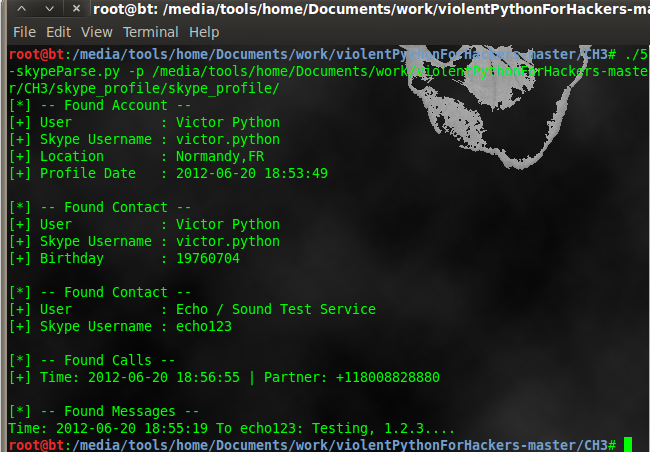
This python script extract user profile ;call log; contacts & messages from database. But if you want to extract other things which are stored in main.db then you can add simple function to script.

#!/usr/bin/python
import sqlite3
import optparse
import os

def printProfile(skypeDB):
conn = sqlite3.connect(skypeDB)
c = conn.cursor()
c.execute(“SELECT fullname, skypename, city, country, \
datetime(profile_timestamp,’unixepoch’) FROM Accounts;”)

for row in c:
print ‘[*] — Found Account –‘
print ‘[+] User : ‘+str(row[0])
print ‘[+] Skype Username : ‘+str(row[1])
print ‘[+] Location : ‘+str(row[2])+’,’+str(row[3])
print ‘[+] Profile Date : ‘+str(row[4])

def printContacts(skypeDB):
conn = sqlite3.connect(skypeDB)
c = conn.cursor()
c.execute(“SELECT displayname, skypename, city, country,\
phone_mobile, birthday FROM Contacts;”)

for row in c:
print ‘\n[*] — Found Contact –‘
print ‘[+] User : ‘ + str(row[0])
print ‘[+] Skype Username : ‘ + str(row[1])

if str(row[2]) != ” and str(row[2]) != ‘None’:
print ‘[+] Location : ‘ + str(row[2]) + ‘,’ \
+ str(row[3])
if str(row[4]) != ‘None’:
print ‘[+] Mobile Number : ‘ + str(row[4])
if str(row[5]) != ‘None’:
print ‘[+] Birthday : ‘ + str(row[5])

def printCallLog(skypeDB):
conn = sqlite3.connect(skypeDB)
c = conn.cursor()
c.execute(“SELECT datetime(begin_timestamp,’unixepoch’), \
identity FROM calls, conversations WHERE \
calls.conv_dbid = conversations.id;”
)
print ‘\n[*] — Found Calls –‘

for row in c:
print ‘[+] Time: ‘+str(row[0])+\
‘ | Partner: ‘+ str(row[1])

def printMessages(skypeDB):
conn = sqlite3.connect(skypeDB)
c = conn.cursor()
c.execute(“SELECT datetime(timestamp,’unixepoch’), \
dialog_partner, author, body_xml FROM Messages;”)
print ‘\n[*] — Found Messages –‘

for row in c:
try:
if ‘partlist’ not in str(row[3]):
if str(row[1]) != str(row[2]):
msgDirection = ‘To ‘ + str(row[1]) + ‘: ‘
else:
msgDirection = ‘From ‘ + str(row[2]) + ‘ : ‘
print ‘Time: ‘ + str(row[0]) + ‘ ‘ \
+ msgDirection + str(row[3])
except:
pass

def main():
parser = optparse.OptionParser(“usage %prog “+\
“-p “)
parser.add_option(‘-p’, dest=’pathName’, type=’string’,\
help=’specify skype profile path’)

(options, args) = parser.parse_args()
pathName = options.pathName
if pathName == None:
print parser.usage
exit(0)
elif os.path.isdir(pathName) == False:
print ‘[!] Path Does Not Exist: ‘ + pathName
exit(0)
else:
skypeDB = os.path.join(pathName, ‘main.db’)
if os.path.isfile(skypeDB):
printProfile(skypeDB)
printContacts(skypeDB)
printCallLog(skypeDB)
printMessages(skypeDB)
else:
print ‘[!] Skype Database ‘+\
‘does not exist: ‘ + skpeDB

if __name__ == ‘__main__’:
main()

skype-extract

skype-extract

Use of script:

chmod +x scriptname
./scriptname.py -p path of D.B. according to your O.s.