Extract Data from Chrome Database.

Today we extract data from google-chrome sqllite database using python script.Chrome contain lots of information in its database like history ;cookies; search history ; autofill ;download ;addons and more.Database location are different in different O.S.

In windows C:\\Users\user_name/AppData/Local/Google/Chrome/User Data/Default/

In linux /root/.config/google-chrome/Default

Extract Autofill data script:-

#!/usr/bin/python

import re
import optparse
import os
import sqlite3

def printLoginData(LoginData):
try:
conn = sqlite3.connect(LoginData)
c = conn.cursor()
c.execute(‘SELECT name, value FROM autofill’)

print ‘\n[*] — Found url –‘
for row in c:

print str(row[0]) + ” ” + str(row[1])
except Exception, e:
if ‘encrypted’ in str(e):
print ‘\n[*] Error reading your cookies database.’
print ‘[*] Upgrade your Python-Sqlite3 Library’

def main():
parser = optparse.OptionParser(“usage %prog “+\
“-p ”
)
parser.add_option(‘-p’, dest=’pathName’, type=’string’,\
help=’specify chrome profile path’)

(options, args) = parser.parse_args()
pathName = options.pathName
if pathName == None:
print parser.usage
exit(0)
elif os.path.isdir(pathName) == False:
print ‘[!] Path Does Not Exist: ‘ + pathName
exit(0)
else:
LoginData = os.path.join(pathName, ‘Web Data’)
printLoginData(LoginData)

if __name__ == ‘__main__’:
main()

Extract Cookies from Database:-

#!/usr/bin/python
# -*- coding: utf-8 -*-

import re
import optparse
import os
import sqlite3
def printCookies(cookiesDB):
try:
conn = sqlite3.connect(cookiesDB)
c = conn.cursor()
c.execute(‘SELECT host_key, name, value FROM Cookies’)

print ‘\n[*] — Found Cookies –‘
for row in c:
host = str(row[0])
name = str(row[1])
value = str(row[2])
print ‘[+] Host: ‘ + host + ‘, Cookie: ‘ + name \
+ ‘, Value: ‘ + value
except Exception, e:
if ‘encrypted’ in str(e):
print ‘\n[*] Error reading your cookies database.’
print ‘[*] Upgrade your Python-Sqlite3 Library’
def main():
parser = optparse.OptionParser(“usage %prog “+\
“-p ”
)
parser.add_option(‘-p’, dest=’pathName’, type=’string’,\
help=’specify Chrome profile path’)

(options, args) = parser.parse_args()
pathName = options.pathName
if pathName == None:
print parser.usage
exit(0)
elif os.path.isdir(pathName) == False:
print ‘[!] Path Does Not Exist: ‘ + pathName
exit(0)
else:
cookiesDB = os.path.join(pathName, ‘Cookies’)
if os.path.isfile(cookiesDB):
pass
printCookies(cookiesDB)
else:
print ‘[!] Cookies Db does not exist:’ + cookiesDB

if __name__ == ‘__main__’:
main()

Extract history From Database:-

#!/usr/bin/python
import re
import optparse
import os
import sqlite3
def printCookies(cookiesDB):
try:
conn = sqlite3.connect(cookiesDB)
c = conn.cursor()
c.execute(‘SELECT url, title FROM urls’)

print ‘\n[*] — Found History –‘
for row in c:
host = str(row[0])
name = str(row[1])

print str(row[0]) + ” Title:” + str(row[1])
except Exception, e:
if ‘encrypted’ in str(e):
print ‘\n[*] Error reading your cookies database.’
print ‘[*] Upgrade your Python-Sqlite3 Library’
def main():
parser = optparse.OptionParser(“usage %prog “+\
“-p ”
)
parser.add_option(‘-p’, dest=’pathName’, type=’string’,\
help=’specify chrome profile path’)

(options, args) = parser.parse_args()
pathName = options.pathName
if pathName == None:
print parser.usage
exit(0)
elif os.path.isdir(pathName) == False:
print ‘[!] Path Does Not Exist: ‘ + pathName
exit(0)
else:
cookiesDB = os.path.join(pathName, ‘History’)
if os.path.isfile(cookiesDB):
pass
printCookies(cookiesDB)
else:
print ‘[!] Cookies Db does not exist:’ + cookiesDB

if __name__ == ‘__main__’:
main()

You can also create your script to extract other data from database.

Usage of script:-

chmod +x script_name

./script_name.py -p path of db according to your O.s.
Extract Data From Firefox Database.

Today we extract data from firefox sqllite database using python script.Firefox contain lots of information in its database like history ;cookies; search history ; autofill ;download ;addons and more.Databse location are different in different O.S.

In windows C:\\Users\user_name/AppData/Roaming/Mozilla/Firefox/Profile/your_folder/

In linux /root/.Mozilla/Firefox/Profile/your_folder/

we only extract history ;download ;cookies ; google history.If you want to extract other data just little modification is required.

#!/usr/bin/python
import re
import optparse
import os
import sqlite3

def printDownloads(downloadDB):
conn = sqlite3.connect(downloadDB)
c = conn.cursor()
c.execute(‘SELECT name, source, datetime(endTime/1000000,\
\’unixepoch\’) FROM moz_downloads;’
)
print ‘\n[*] — Files Downloaded — ‘
for row in c:
print ‘[+] File: ‘ + str(row[0]) + ‘ from source: ‘ \
+ str(row[1]) + ‘ at: ‘ + str(row[2])

def printCookies(cookiesDB):
try:
conn = sqlite3.connect(cookiesDB)
c = conn.cursor()
c.execute(‘SELECT host, name, value FROM moz_cookies’)

print ‘\n[*] — Found Cookies –‘
for row in c:
host = str(row[0])
name = str(row[1])
value = str(row[2])
print ‘[+] Host: ‘ + host + ‘, Cookie: ‘ + name \
+ ‘, Value: ‘ + value
except Exception, e:
if ‘encrypted’ in str(e):
print ‘\n[*] Error reading your cookies database.’
print ‘[*] Upgrade your Python-Sqlite3 Library’

def printHistory(placesDB):
try:
conn = sqlite3.connect(placesDB)
c = conn.cursor()
c.execute(“select url, datetime(visit_date/1000000, \
‘unixepoch’) from moz_places, moz_historyvisits \
where visit_count > 0 and moz_places.id==\
moz_historyvisits.place_id;”)

print ‘\n[*] — Found History –‘
for row in c:
url = str(row[0])
date = str(row[1])
print ‘[+] ‘ + date + ‘ – Visited: ‘ + url
except Exception, e:
if ‘encrypted’ in str(e):
print ‘\n[*] Error reading your places database.’
print ‘[*] Upgrade your Python-Sqlite3 Library’
exit(0)

def printGoogle(placesDB):
conn = sqlite3.connect(placesDB)
c = conn.cursor()
c.execute(“select url, datetime(visit_date/1000000, \
‘unixepoch’) from moz_places, moz_historyvisits \
where visit_count > 0 and moz_places.id==\
moz_historyvisits.place_id;”)

print ‘\n[*] — Found Google –‘
for row in c:
url = str(row[0])
date = str(row[1])
if ‘google’ in url.lower():
r = re.findall(r’q=.*\&’, url)
if r:
search=r[0].split(‘&’)[0]
search=search.replace(‘q=’, ”).replace(‘+’, ‘ ‘)
print ‘[+] ‘+date+’ – Searched For: ‘ + search

def main():
parser = optparse.OptionParser(“usage %prog “+\
“-p ”
)
parser.add_option(‘-p’, dest=’pathName’, type=’string’,\
help=’specify skype profile path’)

(options, args) = parser.parse_args()
pathName = options.pathName
if pathName == None:
print parser.usage
exit(0)
elif os.path.isdir(pathName) == False:
print ‘[!] Path Does Not Exist: ‘ + pathName
exit(0)
else:

downloadDB = os.path.join(pathName, ‘downloads.sqlite’)
if os.path.isfile(downloadDB):
printDownloads(downloadDB)
else:
print ‘[!] Downloads Db does not exist: ‘+downloadDB

cookiesDB = os.path.join(pathName, ‘cookies.sqlite’)
if os.path.isfile(cookiesDB):
pass
printCookies(cookiesDB)
else:
print ‘[!] Cookies Db does not exist:’ + cookiesDB

placesDB = os.path.join(pathName, ‘places.sqlite’)
if os.path.isfile(placesDB):
printHistory(placesDB)
printGoogle(placesDB)
else:
print ‘[!] PlacesDb does not exist: ‘ + placesDB

if __name__ == ‘__main__’:
main()

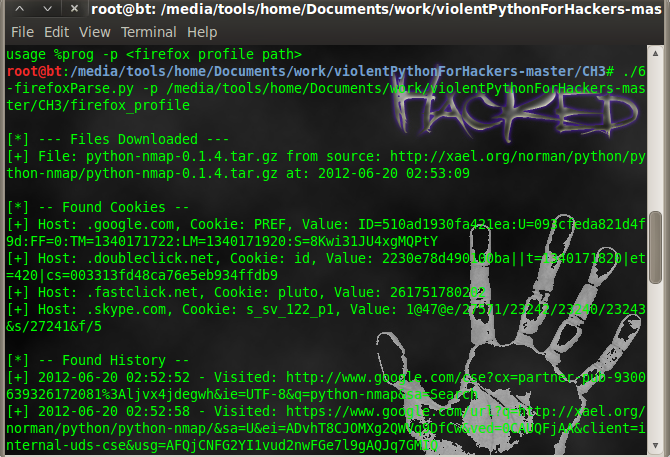
firefox-extract

firefox-extract

Usage of script:-

chmod +x script_name

./script_name.py -p path of db according to your O.s.
Extract contacts ;call log; message from Skype database.

Skype is popular chat utility which store user data in sqlite format in user`s computer.Database name is main.db & it contain Contacts;LegacyMessages;Calls;Accounts;Transfers;Voicemails;Chats;Messages;ContactGroups;Video
;SMS;CallMembers;ChatMembers;Conversations and lot more.Location of database in different operating system is
In windows C:\\Users\user_name\AppData\Roaming\Skype\skype_user_name

In mac Users/user_name/Library//Application/Support/Skype/skype_user_name

In Linux /root/.Skype/skype_user_name

This python script extract user profile ;call log; contacts & messages from database. But if you want to extract other things which are stored in main.db then you can add simple function to script.

#!/usr/bin/python
import sqlite3
import optparse
import os

def printProfile(skypeDB):
conn = sqlite3.connect(skypeDB)
c = conn.cursor()
c.execute(“SELECT fullname, skypename, city, country, \
datetime(profile_timestamp,’unixepoch’) FROM Accounts;”)

for row in c:
print ‘[*] — Found Account –‘
print ‘[+] User : ‘+str(row[0])
print ‘[+] Skype Username : ‘+str(row[1])
print ‘[+] Location : ‘+str(row[2])+’,’+str(row[3])
print ‘[+] Profile Date : ‘+str(row[4])

def printContacts(skypeDB):
conn = sqlite3.connect(skypeDB)
c = conn.cursor()
c.execute(“SELECT displayname, skypename, city, country,\
phone_mobile, birthday FROM Contacts;”)

for row in c:
print ‘\n[*] — Found Contact –‘
print ‘[+] User : ‘ + str(row[0])
print ‘[+] Skype Username : ‘ + str(row[1])

if str(row[2]) != ” and str(row[2]) != ‘None’:
print ‘[+] Location : ‘ + str(row[2]) + ‘,’ \
+ str(row[3])
if str(row[4]) != ‘None’:
print ‘[+] Mobile Number : ‘ + str(row[4])
if str(row[5]) != ‘None’:
print ‘[+] Birthday : ‘ + str(row[5])

def printCallLog(skypeDB):
conn = sqlite3.connect(skypeDB)
c = conn.cursor()
c.execute(“SELECT datetime(begin_timestamp,’unixepoch’), \
identity FROM calls, conversations WHERE \
calls.conv_dbid = conversations.id;”
)
print ‘\n[*] — Found Calls –‘

for row in c:
print ‘[+] Time: ‘+str(row[0])+\
‘ | Partner: ‘+ str(row[1])

def printMessages(skypeDB):
conn = sqlite3.connect(skypeDB)
c = conn.cursor()
c.execute(“SELECT datetime(timestamp,’unixepoch’), \
dialog_partner, author, body_xml FROM Messages;”)
print ‘\n[*] — Found Messages –‘

for row in c:
try:
if ‘partlist’ not in str(row[3]):
if str(row[1]) != str(row[2]):
msgDirection = ‘To ‘ + str(row[1]) + ‘: ‘
else:
msgDirection = ‘From ‘ + str(row[2]) + ‘ : ‘
print ‘Time: ‘ + str(row[0]) + ‘ ‘ \
+ msgDirection + str(row[3])
except:
pass

def main():
parser = optparse.OptionParser(“usage %prog “+\
“-p “)
parser.add_option(‘-p’, dest=’pathName’, type=’string’,\
help=’specify skype profile path’)

(options, args) = parser.parse_args()
pathName = options.pathName
if pathName == None:
print parser.usage
exit(0)
elif os.path.isdir(pathName) == False:
print ‘[!] Path Does Not Exist: ‘ + pathName
exit(0)
else:
skypeDB = os.path.join(pathName, ‘main.db’)
if os.path.isfile(skypeDB):
printProfile(skypeDB)
printContacts(skypeDB)
printCallLog(skypeDB)
printMessages(skypeDB)
else:
print ‘[!] Skype Database ‘+\
‘does not exist: ‘ + skpeDB

if __name__ == ‘__main__’:
main()

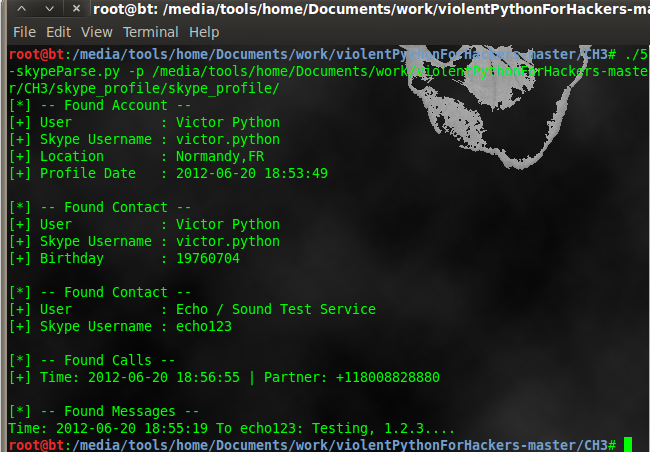
skype-extract

skype-extract

Use of script:

chmod +x scriptname
./scriptname.py -p path of D.B. according to your O.s.

Bash script to extract email address from domain

During social engineering test we need to extract email address from given domain; so we can send them phishing message ;tab nabbing link ;click jacking or iframe which contain link of metasploit exploitation.Today we learn script which extract email address from given domain.This is simple Bash script which visit every web-page of website & then collect email address.

Don`t use for website which has lots of web page because then it has to crawl every page so it will be slow.Speed of script depends on loading speed of website & number of pages.I know it can be enhanced ; if you find any solution regarding to speed than you can comment here.

Download & usage instruction are at bottom of article.

#!/usr/bin/env bash

#E-Harvester is simple script to harvest email address for penetration testing.
#Script is working in two mode
#In first mode you have to create sitemap manually. You can use (http://www.xml-sitemaps.com/) to create sitemap.
#and put sitemap text file in working directory of E-HARVESTING.Give name it to urllist.txt
#Second mode is automatic just specify domain name & it will first crawl website ;then harvest email address ;But it`s slow due to crawling process.

echo ”
_____           _   _    _    ______     _______ ____ _____ _____ ____
| ____|         | | | |  / \  |  _ \ \   / / ____/ ___|_   _| ____|  _ \
|  _|    _____  | |_| | / _ \ | |_) \ \ / /|  _| \___ \ | | |  _| | |_) |
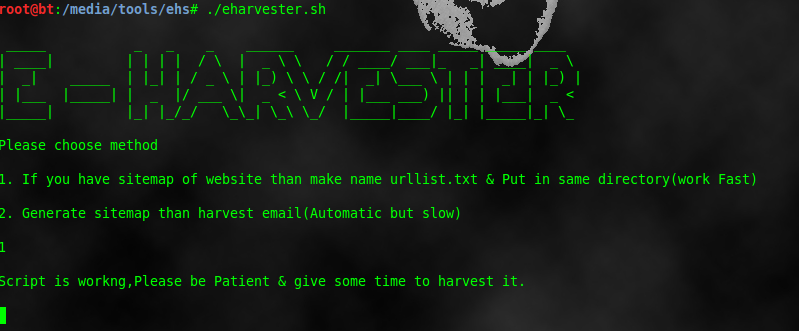

| |___  |_____| |  _  |/ ___ \|  _ < \ V / | |___ ___) || | | |___|  _ <
|_____|         |_| |_/_/   \_\_| \_\ \_/  |_____|____/ |_| |_____|_| \_\


echo “Please choose method”

echo ”
1. If you have sitemap of website than make name urllist.txt & Put in same directory(work Fast)

2. Generate sitemap than harvest email(Automatic but slow)

read m1
if [ “$m1” = “1” ];then
echo ”
Script is workng,Please be Patient & give some time to harvest it.

cat urllist.txt | while read f1
do

w3m $f1 >> f1
perl -wne’while(/[\w\.]+@[\w\.]+/g){print “$&\n”}’ f1 | sort -u >> output.txt
rm f1
done

cat output.txt
echo ”
Harvesting is complete.Open output.txt file to view email address.

fi

if [ “$m1” = “2” ];then
echo ”
Please Enter Website To Harvest Email Address

For example http://tipstrickshack.blogspot.com

read choice
echo ”
Now we have to make urllist of website.So be Patient & give some time to harvest it.

wget –spider –recursive –no-verbose –output-file=wgetlog.txt “$choice”
sed -n “s@.\+ URL:\([^ ]\+\) .\+@\1@p” wgetlog.txt | sed “s@&@\&amp;@” > urllist.txt
rm wgetlog.txt
cat urllist.txt | while read f1
do
w3m $f1 >> f1
perl -wne’while(/[\w\.]+@[\w\.]+/g){print “$&\n”}’ f1 | sort -u >> output.txt
rm f1
done

cat output.txt
echo ”
Harvesting is complete. Open output.txt file to view email address.

echo ”
Use E-sender to send email to harvested email Address

fi


Script work on two mode. In first mode you have to specify sitemap of website ,it is fast.Just visit this URL http://www.xml-sitemaps.com/ & make sitemap of victim website ;download text file of urllist.txt & put it in same directory of script.Now it crawl one by one url from urllist.txt & collect email address.

Second mode is automatic ; just supply domain name ; it make sitemap & then gather email address.But it is slow .

harvesting-email

harvesting-email

How to Download & use?

git clone https://github.com/niravkdesai/ehs.git

cd ehs

chmod +x *

./eharvester.sh

Python script for Extract all images from given url

This python script extract all images from given url & then stored it to local hard drive ;where you can extract metadata & can gather information about victim.Before you have to install BeautifulSoup
third party module.

#!/usr/bin/python

from BeautifulSoup import BeautifulSoup
import os
import optparse

def mirrorImages(url, dir):

html = ab.open(url)
soup = BeautifulSoup(html)
image_tags = soup.findAll(‘img’)

for image in image_tags:
filename = image[‘src’].lstrip(‘http://&#8217;)
filename = os.path.join(dir,\
filename.replace(‘/’, ‘_’))
print ‘[+] Saving ‘ + str(filename)
data = ab.open(image[‘src’]).read()
ab.back()
save = open(filename, ‘wb’)
save.write(data)
save.close()

def main():
parser = optparse.OptionParser(‘usage %prog ‘+\
‘-u -d ‘)

parser.add_option(‘-u’, dest=’tgtURL’, type=’string’,\
help=’specify target url’)
parser.add_option(‘-d’, dest=’dir’, type=’string’,\
help=’specify destination directory’)

(options, args) = parser.parse_args()

url = options.tgtURL
dir = options.dir

if url == None or dir == None:
print parser.usage
exit(0)

else:
try:
mirrorImages(url, dir)
except Exception, e:
print ‘[-] Error Mirroring Images.’
print ‘[-] ‘ + str(e)

if __name__ == ‘__main__’:
main()

Usage:-

chmod +x script_name

./script_name -u url -d directory to save images.

Extract metadata from pdf file using Python script

Metadata is stored in any document by authoring application which can be user-name ; comment ;creation date;modification date. Today we will learn python script to extract metadata from pdf file.
But before that you have to install pypdf python module . For that open terminal & type
pip install pypdf

Pypdf is offers ability to extract document information, split ,merge,crop,encrypt and decrypt documents.

import pyPdf
import optparse
from pyPdf import PdfFileReader

def printMeta(fileName):
pdfFile = PdfFileReader(file(fileName, ‘rb’))
docInfo = pdfFile.getDocumentInfo()
print ‘[*] PDF MetaData For: ‘ + str(fileName)
for metaItem in docInfo:
print ‘[+] ‘ + metaItem + ‘:’ + docInfo[metaItem]

def main():
parser = optparse.OptionParser(‘usage %prog “+\
“-F ‘)
parser.add_option(‘-F’, dest=’fileName’, type=’string’,\
help=’specify PDF file name’)

(options, args) = parser.parse_args()
fileName = options.fileName
if fileName == None:
print parser.usage
exit(0)
else:
printMeta(fileName)

if __name__ == ‘__main__’:
main()

first we import pypdf module ;then optprase module. There is two function available.
(1)main
(2)printMeta

(1)main :-
First some lines are indicated usage message for user & specify argument to supply filename. Whatever file name is supplied by user is saved to fileName variable ;if the file does not exist then it print usage message & stop execution of script.

If file is exist & we supply correct argument then it call second function printMeta.

(2)printMeta(fileName):

pdfFile = PdfFileReader(file(fileName, ‘rb’)) :- read pdf file & saved it to pdfFile .

docInfo = pdfFile.getDocumentInfo() :- Get document info from pdf file & saved it to docinfo.

print ‘[*] PDF MetaData For: ‘ + str(fileName) :- It print [*] PDF MetaData For: filename.

for metaItem in docInfo:
print ‘[+] ‘ + metaItem + ‘:’ + docInfo[metaItem]

above part print every metadata one by one which is extracted from document & saved to docinfo.

python-pdf

python-pdf

Usage of script:-

chmod +x script_name

./script_name -F filename.pdf

Python script to crack MD5 hash using dictionary attack- (2)

Continue from the previous post ; Now we used python to crack MD5 hash using dictionary attack.

#!/usr/bin/python
import sys, re, hashlib
# Check hash length
def chklength(hashes):
if len(hashes) != 32:
print “[-] Improper length for md5 hash.”
sys.exit(1)

# Attempts to crack hash against any givin wordlist.
def dict_attack():
hashes = raw_input(‘\nPlease specify hash value: ‘)
chklength(hashes)

wordlist = raw_input(‘\nPlease specify wordlist path: ‘)
try:
words = open(wordlist, “r”)
except(IOError):
print “[-] Error: Check your wordlist path.\n”
sys.exit(1)

words = words.readlines()
print “\n”,len(words),”words loaded…”
for word in words:
hash = hashlib.md5(word[:-1])
value = hash.hexdigest()
if hashes == value:
print “[+] Password is:”+word,”\n”
sys.exit(0)

print(‘\n1 – Dictionary Attack’)
print(‘2 – Exit’)
selection = raw_input(‘\nSelect an option from above: ‘)
sys.stdout.flush()

if selection == “1”:
dict_attack()
pass

elif selection == “2”:
sys.exit(0)

There are three function in this script.
(1)chklength
(2)dict_attack
(3)man function

we are going in reverse to understand script.

(1)Main function :- when you execute script first two lines display text on screen & asked user input for that task.
print(‘\n1 – Dictionary Attack’)
print(‘2 – Exit’)

Whatever selection from user is saved into the variable selection.
If selection is 1 ; it called function dict_attack() & if selection is 2 it terminate script.

(2)dict_attack :-
hashes = raw_input(‘\nPlease specify hash value: ‘) :- Asked to enter MD5 hash & saved it to variable hashes.

chklength(hashes) :- Now it call function chklength with argument specified is hashes. So what chklength function is do. It check length of MD5 hash ;because MD5 hash is 32 character ;it check if hash is proper or not ;If it is not 32 character long than it print Improper length for md5 hash & exit script.

wordlist = raw_input(‘\nPlease specify wordlist path: ‘) :- It ask to enter path of wordlist file & saved string to variable name wordlist.

words = open(wordlist, “r”) :- open file in read only mode.

except(IOError):
print “[-] Error: Check your wordlist path.\n”
sys.exit(1)

Above part indicate that if we entered wrong path name than it throw error message & stop execution of script.

words = words.readlines() :- read dictionary file.

print “\n”,len(words),”words loaded…” :- Print number of line in dictionary file on screen.

for word in words:
hash = hashlib.md5(word[:-1])
value = hash.hexdigest()

Above part indicate that it takes first word from word list file than calculate MD5 hash & then calculate digest & final value is saved in variable value.

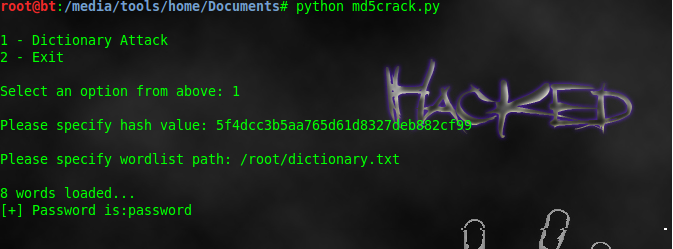
If our calculated value & entered value is same than it print password is “+word,”\n” , otherwise for loop is running for number of words in dictionary file & doing above process.

md5-crack-python-script

md5-crack-python-script

Usage of script:-

chmod +x script_name.py

./script_name.py

Python script to crack MD5 hash using dictionary attack- (1)

Today we are going to learn how to write script to crack MD5 hash.MD5 is a message digest protocol ; In most of database password are saved in MD5 hash format so if database has been compromised then attacker cannot get clear text password but what he get is a one way hash ; which can not decrypt but can be cracked.

We are going to learn shell script & as well as python script to crack MD5 using dictionary attack ;but please don`t use shell script to crack MD5 hash ; because it takes too much time & more CPU resources compare to python script ; Shell script is just for understanding.

#!/usr/bin/env bash
echo “plese enter MD5 hash”
read value
cat  dictionary.txt| while read line1
do

cal=$(echo -n “$line1″|md5sum|cut -c 1-32)
if [ “$cal” == “$value” ]; then
echo “hash cracked password is “$line1″ ”
exit 1
fi
echo “trying “$line1″”
done

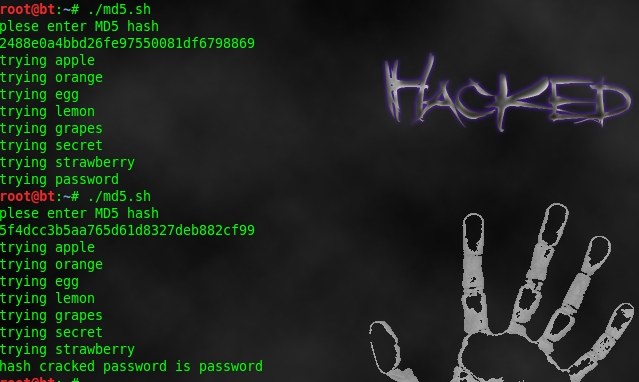
md5crack-script

md5crack-script

Don`t use it to crack password ; because take too much resources & too much time.

In next script we will used python to crack md5 ; it `s too fast compare to shell script.

Zip file password cracker python script

Today we will understand python script to crack specific zip file password by dictionary attack.Python has inbuilt module for zip file which we import at starting of script; then we import optparse ,this allow user to specify user to zip file & dictionary file.Then import threading this allow simultaneous testing of multiple passwords from dictionary.

#!/usr/bin/python
import zipfile
import optparse
from threading import Thread

def extractFile(zFile, password):
try:
zFile.extractall(pwd=password)
print ‘[+] Found password ‘ + password + ‘\n’
except:
pass

def main():
parser = optparse.OptionParser(“usage %prog “+\
“-f -d “)
parser.add_option(‘-f’, dest=’zname’, type=’string’,\
help=’specify zip file’)
parser.add_option(‘-d’, dest=’dname’, type=’string’,\
help=’specify dictionary file’)
(options, args) = parser.parse_args()
if (options.zname == None) | (options.dname == None):
print parser.usage
exit(0)
else:
zname = options.zname
dname = options.dname

zFile = zipfile.ZipFile(zname)
passFile = open(dname)

for line in passFile.readlines():
password = line.strip(‘\n’)
t = Thread(target=extractFile, args=(zFile, password))
t.start()

if __name__ == ‘__main__’:
main()

As usual there is two function(1)main(2)extractfile

(1)main() :-
parser = optparse.OptionParser(“usage %prog “+\ “-f -d “)
Above line display usage option on terminal screen.

parser.add_option(‘-f’, dest=’zname’, type=’string’,\ help=’specify zip file’)
Individual command line option to specify zip file name ;so when we execute script we have to provide -f before zip file name.

parser.add_option(‘-d’, dest=’dname’, type=’string’,\ help=’specify dictionary file’)
Individual command line option to specify dictionary file ;so when we execute script we has to prode -d before dictionary file name.

After that there is if loop which check that if there is invalid zip file or invalid dictionary file name then it print usage message & exit execution.And if zip file name & dictionary file is valid then it saved it name to variable zname & dname.

zFile = zipfile.ZipFile(zname) : It indicate that we instantiate new zip file class by specifying file name of password protected zip file.

passFile = open(dname) :- Open the dictionary file & saved it to passFile.

for line in passFile.readlines(): This loop is executed for number of words in dictionary file.
First read lines from dictionary file ;save string to line ;then strip dictionary one by one word & saved value of word to password.

Now we call extractfile function

(2)extractFile(zFile, password):
zFile.extractall(pwd=password) :- It extract zip file with password from variable password which come from for loop & which is first word of dictionary file, if password is true than it print Found password with password.

Now if password is wrong it threw error message. & for loop is again executed from main function & now password is second word of dictionary file.

zip-file-password-crack

zip-file-password-crack

Usage:-
chmod +x script_name
./script_name -f zip_file_name -d dictionary_file_name